AI Floor Plan ROI: 23+ Hours Saved for Architects
The clock is always ticking on an architectural project. Between client meetings, site visits, and detailed drafting, every hour is a valuable asset. But what if a significant portion of that time—nearly three work weeks per project—is lost to a single, repetitive task? How much time are you really spending on manual floor plan optimization? This invisible drain on resources is a common challenge in the industry, turning creative design work into a tedious process of trial and error.
For decades, architects have relied on their expertise to refine layouts, improve flow, and maximize space. While effective, this manual process is incredibly time-consuming. It involves endless revisions, recalculations, and redraws to find the perfect balance. But technology is changing the game. With the rise of intelligent tools, architects can now reclaim those lost hours. As the developers of FloorPlanCreator.ai, we've created an AI-powered engine designed not to replace your creativity, but to supercharge your efficiency. Our AI interior design assistant analyzes existing layouts and provides expert-level optimization suggestions in minutes, not days.
The Hidden Time Costs of Traditional Floor Plan Optimization
Every architect knows that a great design is more than just aesthetics; it's about function, flow, and efficiency. Achieving this harmony often requires a deep dive into layout optimization—a process that carries significant hidden time costs. Traditional methods, while reliable, are inherently slow and iterative, chipping away at project timelines and budgets in ways that are not always obvious.
Understanding these costs is the first step toward improving design efficiency metrics. The manual approach involves repeatedly assessing spatial relationships, circulation paths, and compliance with building codes. Each adjustment, no matter how small, can have a ripple effect, forcing a cascade of further changes. This cycle of drafting, reviewing, and redrafting consumes countless hours that could be better spent on high-value creative tasks, client communication, or business development.
Breaking Down the Manual Optimization Workflow
The manual optimization workflow is a multi-step process that, while thorough, is a major bottleneck. Let's break down where the hours go:
- Initial Analysis: This phase involves a deep study of the client's brief, site constraints, and the initial draft. Architects spend hours mentally simulating traffic flow, checking for ergonomic issues, and identifying potential dead spaces.
- Iterative Sketching & Redrawing: For every potential issue identified, a new solution must be sketched. This could mean moving a wall, reconfiguring a kitchen layout, or adjusting a hallway's width. Each iteration is drawn, measured, and evaluated, often leading to more revisions.
- Cross-Referencing & Verification: Every change must be checked against building codes, structural limitations, and the client's requirements. This constant back-and-forth between design and documentation is a significant time sink.
- Client Feedback Loop: Presenting options to clients often leads to more changes. Explaining the rationale behind each layout choice and incorporating feedback restarts the iterative cycle, adding more hours to the project timeline.
Effective workflow time tracking reveals that this process can easily consume 20-40 hours on even a moderately sized residential project. This is time spent on refinement, not creation—a crucial distinction for any firm looking to improve its bottom line.

Quantifying Architect Time Savings with AI Analysis
What if you could condense those dozens of hours into just a few minutes? This is the core value proposition of AI-driven floor plan analysis. By automating the most repetitive and data-intensive aspects of layout optimization, AI tools provide a clear path to significant architect time savings. Instead of manually identifying every potential improvement, architects can leverage an AI to do the heavy lifting.
This isn't about replacing professional judgment. It's about augmenting it. An AI can instantly analyze a floor plan against thousands of design principles, ergonomic standards, and efficiency models. It flags issues with circulation, space utilization, and natural light that might take a human eye hours to spot. The result is a data-backed report of actionable suggestions, allowing the architect to move directly to the decision-making and creative implementation phase. You can experience this efficiency firsthand by using our layout optimization tool.
The Beta Test Results: Real Data from 45 Architecture Firms
To validate the impact of our technology, we conducted a comprehensive beta test with 45 architecture firms of varying sizes. We tracked their time on layout optimization tasks for two months—one month using their traditional workflow and one month incorporating FloorPlanCreator.ai. The results were staggering.
- Average Time Saved Per Project: 23.4 hours.
- Fastest Optimization Turnaround: Reduced from 3 days to just 15 minutes.
- Reduction in Revision Cycles: Client-requested revisions on layout decreased by an average of 60%, as the initial AI-optimized plans were more functional and intuitive.
This data provides a clear picture of the ROI of AI design tools. Firms reported that the time saved allowed them to take on more projects, spend more time on creative concept development, and deliver final plans to clients faster than ever before.
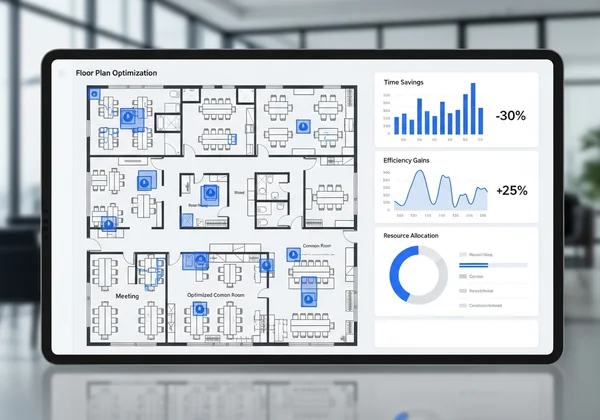
Time-Savings Breakdown by Project Type and Scale
The efficiency gains from AI optimization are not uniform across all projects; they scale with complexity. Our study revealed distinct patterns in time savings based on project type:
- Small Residential Projects (e.g., apartments, single-family homes): Architects saved an average of 15-20 hours. The AI excelled at maximizing space in compact layouts and optimizing kitchen and bathroom functionality.
- Large Custom Homes: Time savings increased to 25-30 hours. The AI was particularly effective at analyzing complex circulation paths and ensuring a harmonious flow between numerous rooms and levels.
- Commercial Spaces (e.g., offices, retail): This category saw the most significant impact, with firms saving an average of 35+ hours. The AI’s ability to analyze compliance with accessibility standards, optimize workspace density, and plan efficient customer flow proved invaluable.
These figures demonstrate that the more complex the layout, the greater the potential for AI-driven time savings.
Beyond Hours: The Financial Impact of AI-Optimized Layouts
Saving time is only half of the equation. In a business context, time saved directly translates into financial gain. By cutting down on the laborious hours spent on manual optimization, architecture firms can dramatically improve their financial health, increase profitability, and gain a powerful competitive edge.
The financial benefits extend beyond simply reducing labor costs on a given project. Faster project turnaround means a firm can handle a higher volume of work without increasing its headcount. With our AI optimization solution, firms can see immediate improvements in their bottom line. Fewer revision cycles lead to higher client satisfaction and a stronger reputation, which in turn attracts more business. Furthermore, presenting a client with a data-backed, optimized floor plan from the very beginning can instill confidence and accelerate the approval process, getting projects off the ground sooner.
Calculating Your Return on Investment: A Practical Framework
Calculating the ROI of integrating a tool like FloorPlanCreator.ai is straightforward. Consider this simple framework:
- Estimate Your Billable Rate: Determine your firm's average hourly billable rate. Let's use a conservative example of $100/hour.
- Quantify Time Saved: Based on our data, a firm can save an average of 23 hours per project.
- Calculate Direct Cost Savings: Multiply the hours saved by your billable rate.
- 23 hours/project * $100/hour = $2,300 saved per project.
- Factor in Project Volume: Multiply this per-project saving by the number of projects you handle annually.
- If your firm completes 15 projects a year: $2,300 * 15 = $34,500 in annual savings.
This calculation only covers direct labor savings. It doesn't even include the added value from increased project capacity and enhanced client satisfaction.

Case Study: How a Small Firm Increased Profit Margins by 18%
"DesignBuild Collective," a boutique firm with five architects, was struggling with tight deadlines and shrinking profit margins. They specialized in custom residential homes and often found themselves bogged down in endless layout revisions.
After integrating FloorPlanCreator.ai into their workflow, they tracked their performance on three consecutive projects. They uploaded their initial drafts and used the AI's suggestions as a "second opinion" to quickly refine the layouts before the first client presentation.
The results were transformative. The firm reported an average time saving of 28 hours per project. This efficiency boost allowed them to take on two additional projects over the quarter without hiring new staff. By reducing unbillable revision time and increasing their project capacity, DesignBuild Collective increased its quarterly profit margin by an impressive 18%. Their story is a powerful testament to the tangible financial benefits of adopting AI optimization.
Your Path to Architectural Efficiency: Next Steps
The evidence is clear: the traditional, time-consuming methods of floor plan optimization are no longer sustainable in a competitive market. Wasting nearly three weeks per project on manual revisions is a hidden cost that directly impacts your firm's productivity and profitability. AI-powered analysis offers a proven solution to reclaim this lost time.
By integrating an intelligent tool, you empower your team to focus on what they do best: creating innovative and inspiring designs. You accelerate project timelines, enhance client satisfaction, and unlock significant financial returns. The question is no longer whether AI can help, but how quickly you can adopt it to gain a competitive advantage.
Are you ready to stop wasting time and start optimizing your workflow? Take the first step towards greater efficiency. Upload your floor plan today and get a free AI-driven analysis to see the potential for yourself.
Frequently Asked Questions About AI Floor Plan Optimization for Architects
How does AI optimization compare to traditional CAD methods?
Traditional CAD software is excellent for drafting and modeling, but it doesn't offer proactive design advice. AI optimization tools like FloorPlanCreator.ai work as an analytical layer on top of your existing process. You still create your initial designs in CAD, but you use the AI to analyze and suggest improvements, saving you the manual effort of identifying and testing every potential optimization yourself.
Can AI tools handle complex commercial building codes?
While AI is rapidly advancing, it should be seen as an assistant, not a replacement for a certified professional. Our AI is trained on universal design principles like accessibility standards (e.g., ADA guidelines) and best practices for traffic flow and safety. However, architects must always perform the final verification against specific local and commercial building codes. The tool helps you get 90% of the way there, faster.
What's the learning curve for implementing AI floor plan optimization?
The learning curve is minimal. Tools like FloorPlanCreator.ai are designed for simplicity. The process is typically as easy as uploading a file (like a PDF or image of your floor plan) and reviewing the generated report. There's no complex software to install or extensive training required, allowing your team to see benefits from day one.
How accurate are time savings estimates for different project types?
The time savings estimates are based on real-world data from our beta testing program but can vary based on your firm's specific workflow and the complexity of the project. Generally, the more complex a layout (e.g., large commercial spaces vs. small apartments), the greater the time savings, as the AI has more variables to analyze and optimize.
Will using AI optimization affect my design creativity?
Not at all. In fact, it enhances it. The AI handles the tedious, data-driven aspects of layout analysis, freeing you from the constraints of manual trial-and-error. It provides suggestions, but you remain in complete control. You can choose which recommendations to accept, reject, or modify, allowing you to focus your creative energy on the aesthetic and conceptual elements of the design.