BIM & CAD Integration: AI Floor Plan Optimization for Architects
The modern architect faces a difficult challenge. You must balance high-quality design with extremely tight deadlines. In a world where clients expect instant results, how do you ensure every layout is perfect? Manual reviews take hours. Furthermore, small errors in spatial flow can lead to costly changes later in the construction phase.
How can AI help you maintain design excellence while increasing your speed? The answer lies in the integration of AI-driven analysis into your existing BIM and CAD workflows. This article explores how professional tools can transform your process from manual drafting to intelligent optimization.
By using an AI floor plan creator, you can now identify hidden flaws in your designs within seconds. Let’s dive into why this technology is becoming a staple in modern architectural practice.

Why AI Floor Plan Optimization is Essential for Modern Architectural Practice
The architectural industry is shifting. Traditional methods of drawing and reviewing plans are no longer enough to stay competitive. Today, efficiency is just as important as creativity. Architects who embrace AI tools are finding they can deliver better results in half the time.
Time Constraints and Design Quality in Contemporary Architecture
Architects today are under more pressure than ever. Project timelines are shrinking, but the complexity of buildings is increasing. When you are rushed, it is easy to miss a narrow corridor or a poorly placed door. These small mistakes impact the living experience of the final user.
Quality control often suffers when deadlines loom. However, AI never gets tired and overlooks no details. By using a tool to analyze floor plans, you can catch these issues early. This allows you to focus your energy on the creative aspects of the project. You no longer have to spend hours on the repetitive task of checking dimensions and flow.
The Evolution of Floor Plan Analysis: From Manual Review to AI Assistance
In the past, plan analysis meant printing out large sheets and using red pens. This manual review was slow and prone to human error. Then came CAD and BIM. While these tools made drawing easier, they still required the architect to do all the heavy lifting regarding spatial optimization.
The latest step in this evolution is AI assistance. Instead of just being a digital drawing board, the software now acts as a consultant. It looks at your layout and suggests ways to improve traffic flow or maximize natural light. This transition from "drawing" to "optimizing" is a game-changer for the profession.
Seamless Integration: Connecting FloorPlanCreator.ai with Your BIM and CAD Workflows
Adopting new technology can feel overwhelming if it doesn't fit into your current routine. Fortunately, modern AI tools are designed to work alongside the software you already use, like AutoCAD or Revit. You don't need to change your entire process to see the benefits.
Step-by-Step Integration with Popular CAD Platforms
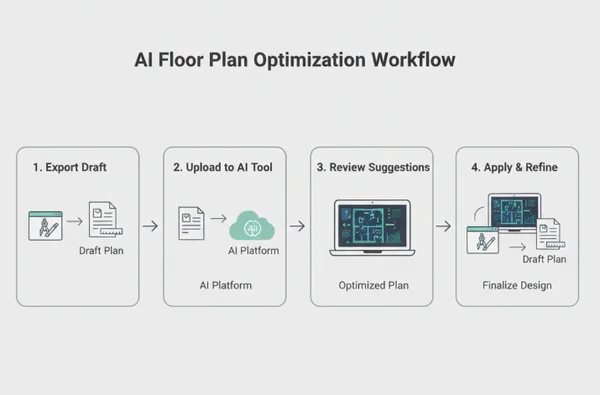
Using AI optimization is a straightforward process. You start by creating your initial draft in your preferred CAD software. Once you have a basic layout, you can upload your plan to the AI engine for a professional "second opinion."
-
Export your draft: Save your current CAD layout as a high-quality image or PDF.
-
Upload for analysis: Drop the file into the AI tool. The system will immediately begin scanning the spatial logic.
-
Review suggestions: The AI provides a list of optimizations, such as better furniture placement or improved room connections.
-
Apply and Refine: Take those insights back to your BIM software to finalize the professional blueprints.
Importing and Exporting: File Formats and Compatibility
One of the biggest concerns for architects is file compatibility. You need a tool that speaks your language. Most professional AI optimizers support standard formats like JPG, PNG, and PDF. This makes it easy to move data between your drawing software and the AI engine.
After the AI generates an optimized version of your plan, you can download the high-resolution results. These visuals are perfect for client presentations. They show the "before and after" clearly. This helps you explain your design choices with visual evidence. If you want to generate new designs, the process remains fast and compatible with your existing digital library.
Real-World Applications: Case Studies in AI Floor Plan Optimization
To understand the true power of AI, we must look at how it performs in the field. From small homes to large offices, AI-driven insights are solving real architectural problems every day.
Case Study 1: Residential Project Optimization and Client Presentation Enhancement
A boutique architecture firm was working on a 1,500-square-foot residential renovation. The client wanted an open-concept feel. However, the existing load-bearing walls made the traffic flow awkward. The architect used an online tool to analyze the constraints.
The AI suggested a slight shift in the kitchen island placement. It also recommended a 10-degree change in the hallway entry. These small adjustments improved the sightlines significantly. When the architect presented the AI-optimized plan alongside the original, the client was impressed by the data-driven logic. It wasn't just an opinion; it was a layout backed by spatial intelligence.
Case Study 2: Commercial Space Efficiency and Regulatory Compliance
In a commercial office project, every square foot equals money. An architect needed to fit 50 workstations into a floor. They had to maintain fire safety codes and comfortable walking paths. Manual calculations were taking days to finalize.
By using AI optimization, the architect tested five different desk configurations in under ten minutes. The AI identified which layout offered the best "dwell time" and emergency exit access. This ensured the project met all regulatory standards while maximizing the tenant's usable space. You can test your layout similarly to find the most efficient use of any commercial area.
Maximizing ROI: Quantifying the Benefits of AI Floor Plan Analysis
For firm principals, the decision to use AI often comes down to the bottom line. Return on Investment (ROI) is measured in time saved and clients won. AI is not just a digital novelty. It is a financial asset for your business.
Time Savings and Project Efficiency Metrics
Consider this: an AI can perform a spatial audit in three minutes, while the same task would take a junior architect three hours. The time savings are substantial. This efficiency allows your team to handle more projects simultaneously without increasing your total headcount.
By reducing the number of revision cycles, you also decrease project "drift." When the first draft is already 90% optimized by AI, you spend less time going back and forth with clients. Research shows that firms using AI optimization can reduce revision time by up to 30%. This speed provides a major competitive advantage. To see these savings for yourself, try the service on your next project.
Enhancing Client Proposals with Data-Backed Design Recommendations
Clients today are tech-savvy. They appreciate when an architect uses advanced tools to ensure their home or office is perfect. When you can say, "We ran your layout through an AI optimizer to ensure maximum sunlight," you build immense trust.
Data-backed recommendations are harder to argue with than subjective style choices. This professional edge helps you win more bids and command higher fees. It moves you from being a "drafter" to being a "strategic consultant." In a competitive market, being able to prove that your design is mathematically optimized for flow and efficiency is a powerful closing tool.
AI Integration: Elevating Your Architectural Practice
AI integration has moved from futuristic concept to present-day essential in modern architectural practice. By combining your creative vision with AI’s analytical power, you create spaces that are more efficient, more beautiful, and more functional.
Our examination demonstrates how AI delivers time savings, builds client confidence, and seamlessly integrates with your existing CAD and BIM workflows. It acts as a digital partner that never sleeps. It helps you catch errors and discover hidden potential in every floor plan.
Ready to enhance your design process and stay ahead of the curve? Upload your CAD files to FloorPlanCreator.ai and experience the power of AI-assisted floor plan optimization today. Start your optimization now and see the difference that intelligent design can make for your firm's reputation and profitability.
About the Author: Marcus Thorne is a licensed architect and BIM strategist with over 15 years of experience in digital transformation. He specializes in integrating emerging technologies into large-scale commercial and residential workflows to maximize design efficiency.
Frequently Asked Questions About AI Floor Plan Integration for Architects
How does FloorPlanCreator.ai maintain design intent when providing optimization suggestions?
The tool is designed to be a "non-destructive" assistant. It analyzes your existing layout and offers suggestions as a list of improvements. You have full control over which changes to accept. This ensures that your unique creative vision remains the core of the project while the AI simply helps you "polish" the functional details.
What file formats are supported for importing CAD and BIM files?
You can easily upload your plans in common formats like JPG, PNG, and PDF. While the tool does not directly open "raw" .dwg or .rvt files, exporting your view to a high-resolution PDF or image is a standard step in any architectural workflow. This makes the integration quick and seamless.
Can I integrate AI floor plan optimization into my existing project management workflow?
Yes. Because the tool is web-based and handles standard file formats, it fits perfectly between your drafting phase and your client review phase. Many firms use it as a "milestone check." This ensures a layout is optimized before it is sent to the structural engineer or the client.
How does the tool handle complex architectural elements like custom fixtures and unique spaces?
The AI is trained on thousands of professional design principles. It recognizes standard elements like walls, doors, and windows, but it also understands spatial volume. If you have a unique space, you can input specific design requirements into the tool. The AI will then provide suggestions that respect those custom constraints while still looking for ways to improve the layout.