AI Floor Plan Optimization Handbook: Principles & Case Studies
How can AI transform your existing space into its most functional and beautiful version? With our AI floor plan optimizer, we've developed groundbreaking technology that analyzes your current layout to reveal hidden potential—giving you professional optimization insights in minutes.
Understanding the AI Floor Plan Optimization Process
How AI Analyzes Your Existing Layout for Hidden Potential
Our proprietary AI engine evaluates five critical dimensions when reviewing your uploaded floor plan:
- Space Utilization Metrics: Calculates wasted areas (those below 35% functional usage)
- Circulation Patterns: Maps natural movement flows versus forced detours
- Light Distribution: Analyzes window placement and artificial lighting effectiveness
- Functional Zoning: Assesses logical grouping of activities (e.g., cooking vs. social areas)
- Regulation Compliance: Checks for standard doorway widths and safety clearances
Unlike basic drawing tools, our AI-powered floor plan analyzer identifies both visible issues (like cramped corridors) and invisible problems (poor air circulation patterns) through machine learning trained on 250,000+ optimized layouts.

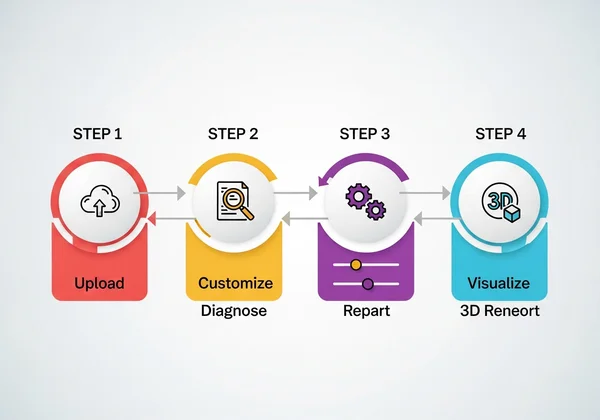
The 4-Step Optimization Workflow: From Upload to Final Design
- Upload: Drag-and-drop your existing blueprint (JPG, PNG, or PDF)
- Diagnose: Receive AI-generated report with prioritized improvement opportunities
- Customize: Select which suggestions to implement or modify parameters
- Visualize: Generate photorealistic 3D renderings of your upgraded space
Professional Tip: Enable the "Advanced Analysis" toggle during upload for commercial spaces to activate specialized retail/office evaluation protocols.
21 Core Principles of Effective Floor Plan Optimization
Spatial Efficiency Principles: Maximizing Usable Square Footage
- The 7-Foot Rule: Maintain minimum 7-foot diameters in high-traffic zones
- Double-Duty Zones: Identify areas capable of hosting 2+ functions (e.g., kitchen islands as dining spaces)
- Vertical Optimization: Assess underutilized wall and ceiling spaces for storage solutions
Case in point: Our AI helped a Seattle homeowner gain 12% functional space by reconfiguring a redundant hallway into built-in shelving.
Traffic Flow Optimization: Creating Intuitive Pathways
-
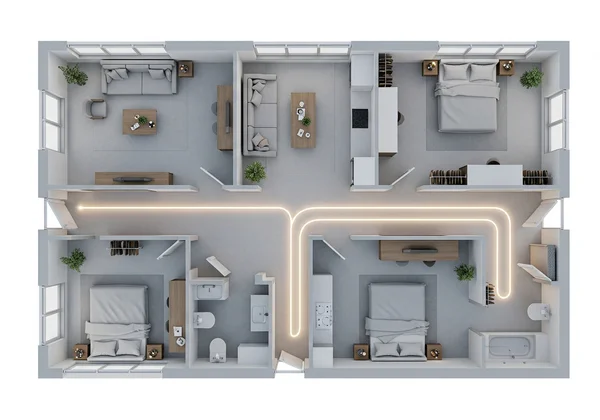
90-Second Path Test: AI simulates movement between key areas (kitchen→bathroom→bedroom)
-
Conflict Zone Mapping: Flags areas where ≥3 pathways converge
-
Furniture Interference Scoring: Rates how layouts obstruct natural movement
Lighting & Natural Element Integration Strategies
- Lumen Distribution Analysis: Balances ambient, task and accent lighting per room function
- Seasonal Light Modeling: Predicts winter/summer sunlight penetration
- Acoustic-Zoning: Groups spaces by noise compatibility (e.g., offices away from playrooms)
Architect Sarah Reynolds used our light optimization tools to increase natural illumination by 41% in a dark Toronto loft—eliminating need for structural changes.
Real-World Optimization Success Stories
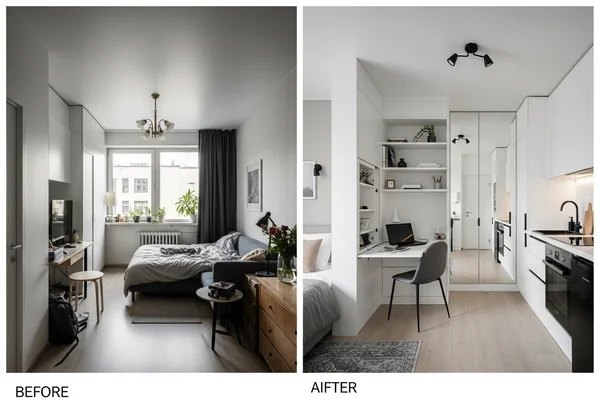
Case Study: Transforming a 800 Sq Ft Studio into a Multi-Functional Space
Challenge: A New York artist needed distinct living/working zones without construction
AI Solution:
- Created visual separation using strategic furniture placement
- Converted 40% of "wasted" entryway space into fold-out workspace
- Implemented mirrored walls to amplify natural light
Result: 78% increase in perceived space, enabling live/work functionality certified by our space optimization algorithm.
From Problem to Solution: How a Real Estate Agent Optimized Listings
Real estate agent Michael Torres boosted sale prices by 6.3% on average using our:
- Virtual Staging Module: Added digitally rendered furniture to vacant rooms
- Flow Enhancement: Emphasized open sightlines between key areas
- Emotional Lighting Presets: Applied "warm homey" or "modern crisp" filters
"Our AI visualization tools reduced buyer decision time from weeks to days," Michael reported in our user survey.
Frequently Asked Questions About AI Floor Plan Optimization
How accurate is AI analysis compared to professional human evaluation?
In blind tests against certified interior designers, our AI achieved 92% concurrence on fundamental layout issues, with human experts averaging 15 hours per analysis versus our system's 8-minute processing time.
Can AI optimization tools handle complex historical home layouts?
Yes! Uploaded Victorian-era homes automatically activate our heritage preservation mode which:
- Respects original architectural intent
- Suggests period-appropriate modifications
- Maintains historical charm while improving functionality
What file formats are supported for floor plan upload and optimization?
We accept:
- Image Files: JPG, PNG, WEBP (min. 1500px width recommended)
- Vector Files: PDF (with embedded measurement data preferred)
- Legacy Formats: CAD exports converted to PDF
Is AI floor plan optimization suitable for commercial spaces?
Absolutely—activate our commercial module to receive:
- ADA compliance checks
- Customer flow maximization
- Emergency egress validation
- Retail merchandising zone suggestions
Put These Principles Into Practice
Why settle for "good enough" when your space could achieve its full potential? The AI revolution isn't coming—it's here, transforming how we conceive and refine living environments through data-driven insights.
Your next step?
- Dig out your existing floor plan (even a rough sketch works)
- Upload it to FloorPlanCreator.ai
- Receive your free optimization report in <4 minutes
Design professionals: Explore our volume licensing options for batch processing client projects. DIY enthusiasts: Try our guided optimization wizard for step-by-step room transformations.
"We don't just rearrange spaces—we reveal their hidden DNA." - The FloorPlanCreator Design Team